How kratai Works
kratai documents your project as plain JSON in your repo, and is meant to run alongside whatever AI coding agent you already use — not replace it.

Built to run alongside your AI coding agent
kratai isn't where you write code. The intended workflow is to keep it open next to whatever you already use to build — Claude Code, Cursor, or anything else — not instead of it. kratai holds the spec and architecture context; your coding agent holds the implementation context. Keeping those separate means neither one's context fills up with the other's concerns, and both stay grounded in the same repo.
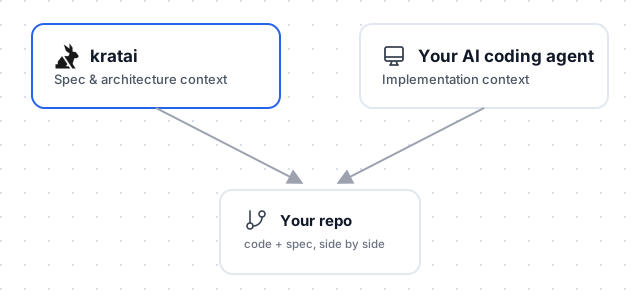
The point of keeping them separate isn't process for its own sake — it's building the right thing, which matters more now that code itself is cheap to generate.
What you can ask it
- Learn about the project — ask it to read
kratai.usecases.jsonandkratai.datamodel.jsonbefore making changes, so it starts from the actual actors, use cases, and data model instead of guessing at the codebase from a quick scan. - Work on a use case — “implement UC-3, and keep NFR-4's response-time constraint in mind.” It has the grounded goal, preconditions, and flow to work from, not just a prompt describing what you want in the moment.
- Consider existing architecture — ask it to check the Class Diagram or Data Model before adding a new entity or changing a flow, so it doesn't contradict relationships that are already there.
How it works
kratai generates a Use Case Model and a Data Model for your project, and saves both as plain JSON files in your repo — kratai.usecases.json and kratai.datamodel.json. No separate server, no proprietary format, no kratai plugin or extension to install in your coding agent either — just ordinary files, readable by anything that can read your repo. Commit them like code.
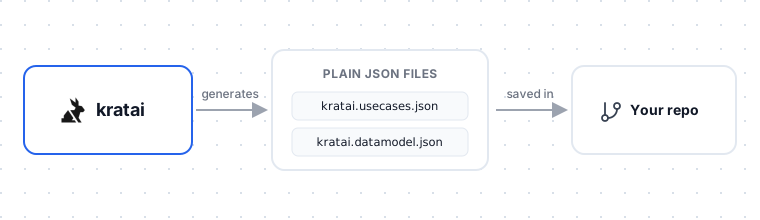
It's not just a feature description. For a use case, your agent reads the actual goal, preconditions, main flow, and postconditions — not a guess from a one-line prompt. For the data model, it reads the entities, their attributes, and the labeled relationships between them — the business rules, not just the foreign keys. That's the difference between an agent improvising a feature and one implementing a precisely defined use case against a schema it already understands.
What runs where
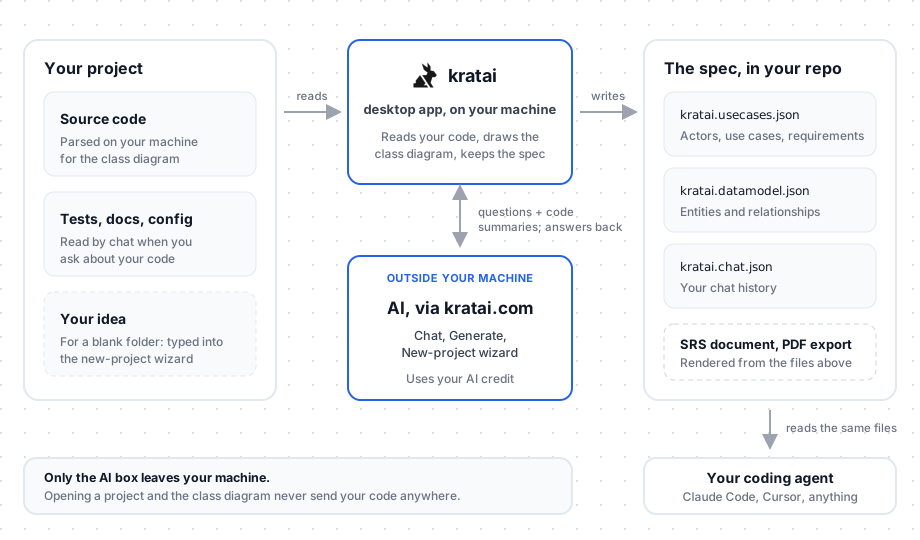
Most of kratai runs on your own machine: it reads your project, draws the class diagram, and keeps the spec files in your repo. Only the AI features — chat, Generate, and the new-project wizard — go through kratai.com to an AI service, and they send what's needed to answer: summaries of your code's structure, your spec, your messages, and the files chat reads when you ask about your code. Opening a project and browsing the class diagram never send your code anywhere. Details are in the Privacy Policy.
Keeping it committed
Commit the spec files like any other code. That keeps everyone — your team and their AI agents — working from the same source of truth, with the spec's evolution visible in your git history instead of living in a separate tool only some of you remember to check. Every developer's coding agent reads the same checked-in files, not a personal copy only they know to update.
Sync is deliberate, not automatic
The spec matches your code only at the moment it's generated. From there you're free to edit it via chat — add detail, change scope, plan ahead — and it won't auto-resync behind your back. Once you're steering it, it's allowed to describe what you're building next, not just what already exists in the code.